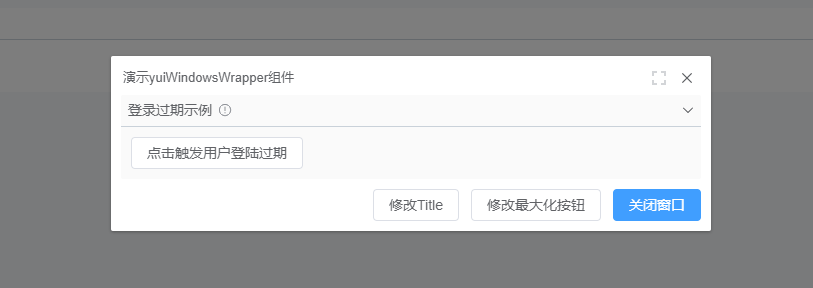
YuiWindowWrapper
基础用法
| 属性 | 值 | 说明 |
|---|---|---|
| :title | string | Dialog 的标题 |
| :isOpen | true/false | 是否显示 Dialog |
| :showMaximize | true/false | 最大化按钮是否Disabled |
| :width | String | 宽度 格式: 600px |
引入YuiWindowWrapper组件
import { YuiWindowWrapper } from "@/components/Application";

export default defineComponent({
  components: {
    YuiWindowWrapper,
  },
 )
使用 yui-window-wrapper 标签:
<yui-window-wrapper
    width="600px"
    :title="data.title"
    :showMaximize="data.Maximize"
    :isOpen="data.isShow"
    @closeModel="close"
    >
    <collapse-container
      class="cl-mb-10"
      title="登录过期示例"
      :can-expan="true"
      help-message="Notification 通知"
    >
      <div class="flex-1">
        <span>
          <el-button :plain="true" @click="sessionTimeout()"
            >点击触发用户登陆过期</el-button
          >
        </span>
      </div>
    </collapse-container>
    <template #footer>
      <span class="dialog-footer">
        <el-button @click="setTitle('testA')">修改Title</el-button>
        <el-button @click="setMaximize(true)">修改最大化按钮</el-button>
        <el-button type="primary" @click="setShow(false)"
          >关闭窗口</el-button
        >
      </span>
    </template>
</yui-window-wrapper>
效果