
排序控制
基础用法
| 属性 | 值 | 说明 |
|---|---|---|
| @current-sort | 函数名 | 指定排序函数 |
| :headerData | sortable: true | 对需要显示排序的列设置sortable |
| :headerData | {slot: "xxxx"} | 预留插槽位置,slot指定需要渲染自定义排序的列 |
html中对需要自定义排序的插槽内容进行渲染
html示例:
<yui-table
    :rowData="rowData数据对象"
    :headerData="headerData数据对象"
    :controlAtrr="controlAtrr数据对象"
    @sort-change="sort_change"
>
</yui-table>
<template #age>
  <el-table-column prop="age" label="年龄" sortable="age_num" width="100">
    <template #default="scope">
      <span slot-scope="scope">{{scope.row["age"]}}</span>
    </template>

  </el-table-column>
</template>
vue.js示例
<script lang="ts">
// 引入yui-table大小样式组件
  import {yuiTableClass} from '@/enums/tableEnum';

  methods: {
      // 排序方法
      sort_change(column) {
        // column.column.sortable 为实际进行排序的prop 名
        this.rowData = this.rowData.sort(this.sortFun(column.column.sortable, column.prop, column.order === 'ascending'));
        console.log(this.rowData)
      },
      // 排序函数
      sortFun(prop_sortable, attr, rev) {
        //第一个参数传入info里的prop表示排的是哪一列,第二个参数是升还是降排序
        if (rev == undefined) {
          rev = 1;
        } else {
          rev = (rev) ? 1 : -1;
        }

        // 判断排序的字段,对齐纯数字字段进行排序
        if (prop_sortable) {
          attr = prop_sortable;
          return function (a, b) {
            a = parseInt(a[attr]);
            b = parseInt(b[attr]);
            if (a < b) {
              return rev * -1;
            }
            if (a > b) {
              return rev * 1;
            }
            return 0;
          }
        } else {
          return function (a, b) {
            try {
              a = parseInt(a[attr]);
            } catch (e) {
              a = a[attr];
            }

            try {
              b = parseInt(b[attr]);
            } catch (e) {
              b = b[attr];
            }

            if (a < b) {
              return rev * -1;
            }
            if (a > b) {
              return rev * 1;
            }

            return 0;
          }
        }


      },


    },

</script>
headerData内容示例
[
  {
    id: 100,
    label: "日期",
    prop: "date",
    width: "150",
    sortable: true,
    fixed: true, // 固定列 true left right

  },
  {
    id: 210,
    label: "姓名",
    prop: "name",
    width: "120",
    sortable: true,

  },
  {
    id: 220,
    label: "地址",
    prop: "address",
    width: "300",
    sortable: true,
  },
  {slot: "age"},
  {
    id: 220,
    label: "数值",
    prop: "num",
    width: "100",
  },

]
效果
年龄列为自定义排序,其他为默认排序 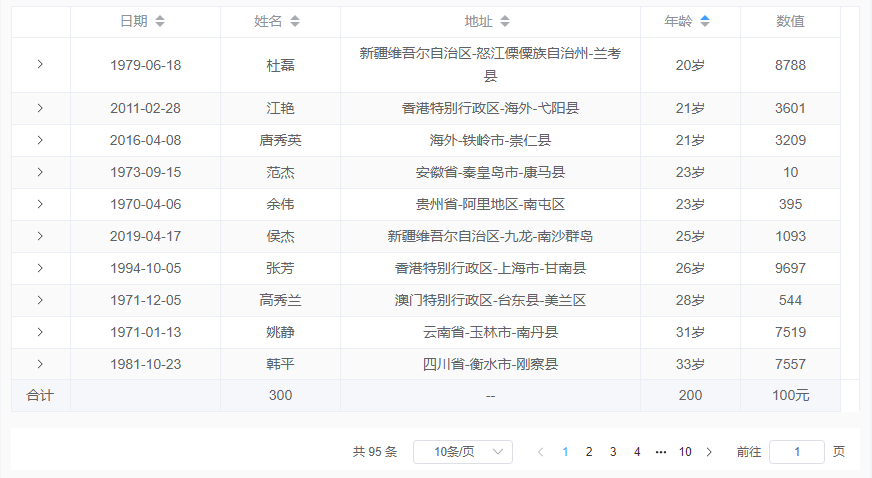
注意事项
排序插槽中的 sortable 属性传递的为实际进行排序的列的prop