
配置行数据可展开
基础用法
| 属性 | 值 | 说明 |
|---|---|---|
| :default_expand_all | true/false | true:全部展开、false:全部收起 |
| :headerData | {slot: "expand"} | 表头对象中预留插槽位置,用于放置展开按钮 |
html中对插槽内容进行渲染
html示例:
<yui-table
    :rowData="rowData数据对象"
    :headerData="headerData数据对象"
    :controlAtrr="controlAtrr数据对象"
    :default_expand_all=false
>
</yui-table>
 <template #expand>
  <el-table-column type="expand" fixed width="60">
    <template #default="scope">
      <span slot-scope="scope">{{scope.row}}</span>
    </template>
  </el-table-column>
</template>
headerData内容示例
[
  {slot: "expand"},

  {
    id: 100,
    label: "日期",
    prop: "date",
    width: "150",

  },
  {
    id: 210,
    label: "姓名",
    prop: "name",
    width: "120",

  },
  {
    id: 220,
    label: "地址",
    prop: "address",
    width: "300",
  },
  {slot: "age"},
  {
    id: 220,
    label: "数值",
    prop: "num",
    width: "100",
  },

]
效果
指定各列显示对应的合计数据内容 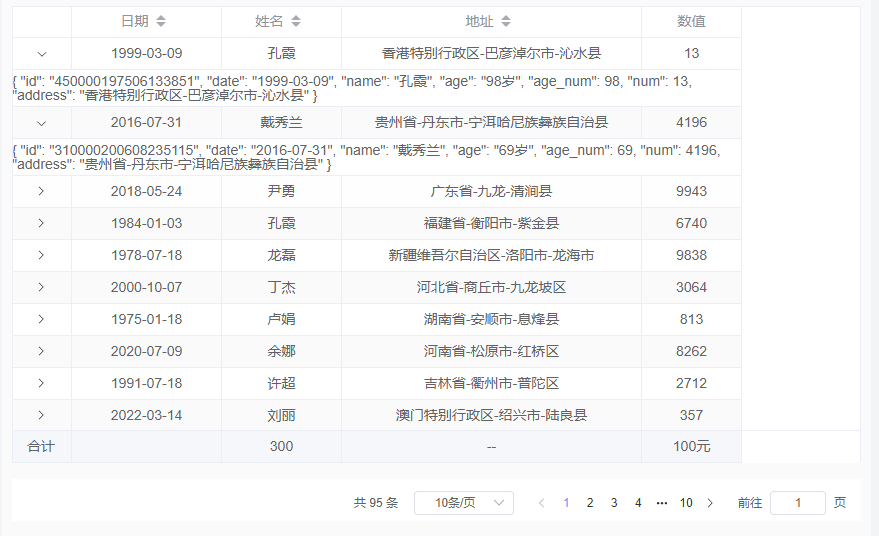
注意事项
expand 插槽内可进一步调整展开内容的样式,参考“自定义列模板”