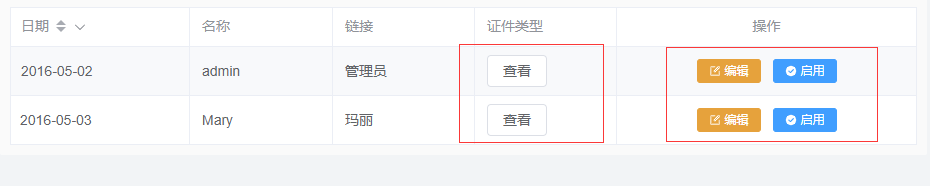
自定义列样式
基础用法
| 属性 | 值 | 说明 |
|---|---|---|
| :headerData | {slot: "cardType"},{slot: "operate"} | 预留插槽位置,用于渲染自定义列 |
html中对需要自定义的插槽内容进行渲染
html示例:
<yui-table
    :rowData="rowData数据对象"
    :headerData="headerData数据对象"
    :controlAtrr="controlAtrr数据对象"
>
</yui-table>
 <template #cardType>
  <el-table-column label="证件类型">
    <el-button size="mini" #default="scope">查看</el-button>
  </el-table-column>
</template>

<template #operate>
  <el-table-column
    slot="operate"
    label="操作"
    align="center"
    width="300"
  >
    <template #default="scope">
      <el-button
        size="small"
        type="warning"
        icon="Edit"
        @click="edit(scope.row)"
      >编辑
      </el-button>
      <el-button
        size="small"
        type="primary"
        icon="SuccessFilled"
        @click="startUsing(scope.row)"
      >启用
      </el-button>
    </template>
  </el-table-column>

</template>
vue.js示例
<script lang="ts">
  // 引入图标
  import {Edit, SuccessFilled } from "@element-plus/icons-vue";

  },

</script>
headerData内容示例
[
  {slot: "date"},
  {label: "名称", prop: "userId"},
  {label: "链接", prop: "userName"},
  {slot: "cardType"},
  {slot: "operate"},
]
效果